Structural Design
Structural Steel Shop Drawings: What They Include and How They Are Prepared

By Alex A
Head of Engineering


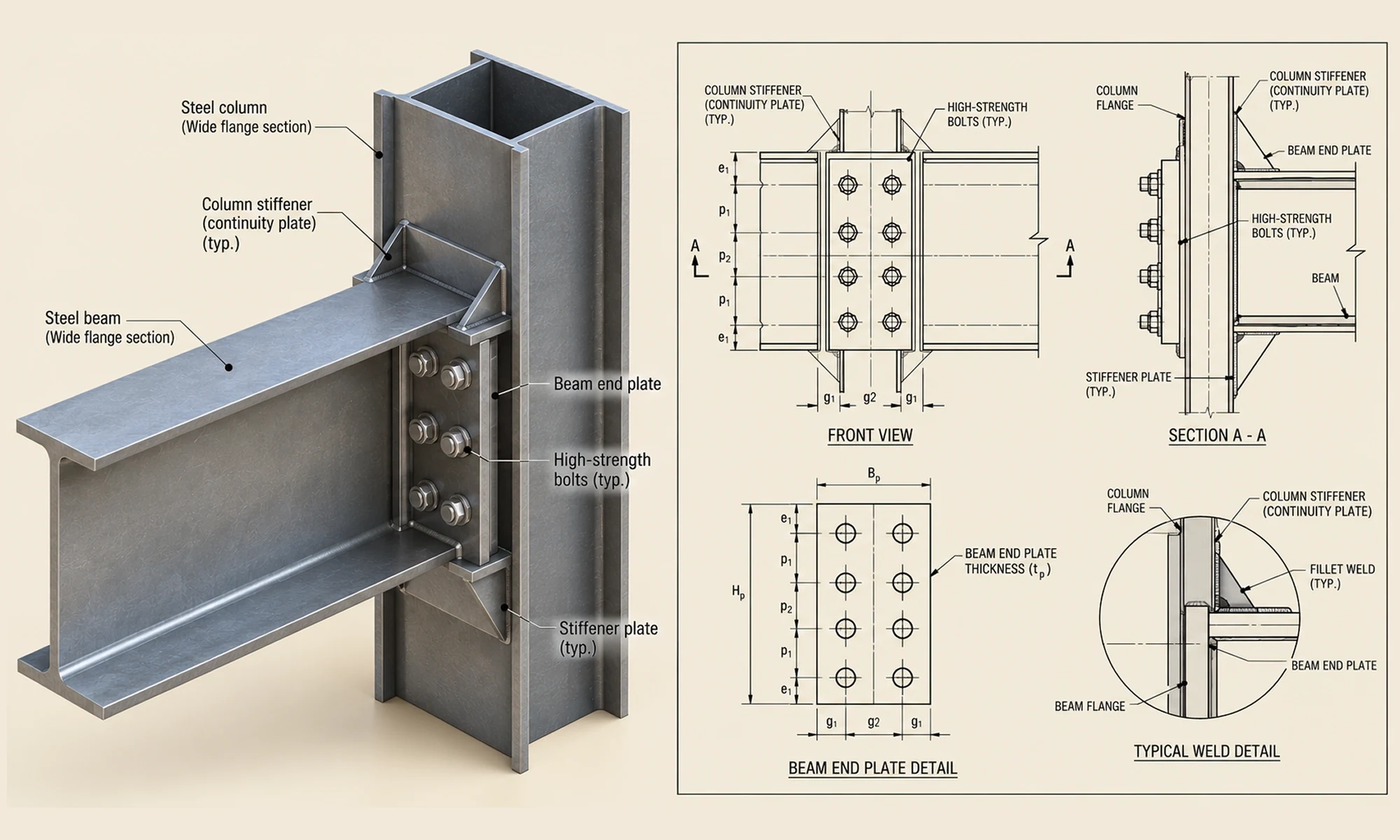
A structural design defines how a steel structure should perform. But when that design reaches the fabrication floor, manufacturers need far more than overall dimensions and design intent. They need precise information for every member, connection, cut, hole and weld.
Structural steel shop drawings bridge that gap. They translate the approved design into detailed, fabrication-ready drawings that guide how individual steel components are manufactured and prepared for assembly and erection.
In this guide, we’ll cover what structural steel shop drawings include, how they are prepared and their role in the fabrication process.
What are structural steel shop drawings?
Shop drawings for structural steel are detailed drawings that show how individual steel members and assemblies are to be fabricated. They provide the dimensions, materials, connections and fabrication details needed to manufacture each component accurately.
Steel detailing is the process that develops this fabrication-level information from the structural design. The resulting shop drawings communicate these details to the fabrication team in a clear, usable format for manufacturing and shop assembly.
For example, a shop drawing for a steel beam may show its section size, exact length, material grade, holes, connection plates, welds and piece mark. This gives the fabricator the specific information needed to manufacture the member without having to interpret the overall structural design.
What information do structural steel shop drawings include?
A structural steel shop drawing gives the fabricator the information needed to make each steel member or assembly accurately. The details vary by project and member type, but most shop drawings cover the following:
Member dimensions and geometry
Shop drawings show the size and shape of each member, including overall dimensions, section sizes, plate thicknesses, cut lengths, copes, notches, and other required features.
For built-up members and assemblies, the drawings also show how individual components are positioned and fit together.
Material specifications and piece marks
Each member and component is assigned a piece mark for identification. The drawing also specifies the required material, like the steel grade, section size, plate thickness and other applicable material requirements.
Piece marks help connect the shop drawings with the fabrication process and erection drawings.
Holes and bolt details
Shop drawings identify the size, location and arrangement of holes required for bolted connections. Where applicable, they also include bolt size, grade, quantity, spacing and other connection requirements.
Weld and connection details
Weld symbols and connection details show how different steel components are to be joined. These may include weld type, size, length and the location of welds.
Drawings may also show connection plates, gusset plates, stiffeners, angles and other components needed to complete the connection.
Assembly and part information
For fabricated assemblies, shop drawings show the individual parts that make up the assembly and how they are positioned relative to one another. Sections, enlarged views, and detailed callouts may be included where additional information is needed for fabrication.
Surface treatment and special requirements
Where required, shop drawings may include information related to surface preparation, painting, galvanizing, fireproofing, camber or other project-specific requirements.
While the details vary by project, the drawing should make it clear to the fabricator exactly what needs to be made.
What are the different types of structural steel shop drawings?
In steel design and fabrication, shop drawings commonly include single-part drawings and assembly drawings, depending on how the fabricated components need to be represented.
Single-part drawings
Single-part drawings show an individual fabricated component, like a plate, beam component, stiffener or other steel part. They provide the dimensions, material information, holes, cuts and other fabrication details needed to manufacture that component.
Assembly drawings
Assembly drawings show multiple individual parts together as a fabricated assembly. They help the fabricator understand how the components fit together and how the completed assembly is arranged.
For more complex assemblies, additional views or sections may be included to clearly show connections and component relationships.
Shop drawings vs. Erection drawings: What's the difference?
Shop drawings and erection drawings are both used in structural steel projects, but they have different purposes.
Shop drawings focus on fabrication. They show the details needed to make each steel member or assembly, like dimensions, materials, holes, welds, bolts and connections.
Erection drawings focus on installation. They show the location and orientation of each steel member, helping the erection team position, align and assemble the steel correctly on site.
| Aspect | Shop Drawings | Erection Drawings |
|---|---|---|
| Main purpose | Fabricating steel members and assemblies | Installing steel members on site |
| Used by | Fabricators and shop teams | Erectors and site teams |
| Focus | Individual members and assemblies | Overall structure and member locations |
| Key information | Dimensions, holes, cuts, welds, bolts, materials, piece marks | Grid lines, elevations, member marks, locations and connection references |
| Stage of use | Before and during fabrication | During steel erection |
How are structural steel shop drawings prepared?
Shop-ready drawings are developed from the project’s design and detailing information. The detailer takes the available structural and GA (general arrangement) drawings, specifications, and other project requirements and develops them into detailed drawings for fabrication.
The workflow typically includes these steps:
1. Review the design and project documents
The detailer first reviews the available structural drawings, GA drawings, specifications, and other relevant project information.
These documents provide the basis for the detailing work. They show the overall arrangement of the structure, member locations, grids, levels, dimensions, member sizes, materials and other design requirements. The detailer also checks the applicable structural design and detailing standards specified for the project.
The detailer reviews this information together to understand how the steelwork is intended to fit and work within the structure.
2. Identify and resolve missing information
During the review, the detailer may find missing dimensions, conflicting information, unclear connections or other issues that could affect detailing.
These items are clarified with the engineer or project team, often through Requests for Information (RFIs). Resolving them before fabrication details are finalized helps reduce revisions and coordination problems later.
3. Develop the 3D steel detailing model
Once the required information is available, the detailer creates a 3D model of the steelwork using software like Tekla Structures, SDS/2 or Advance Steel
The model includes steel members and fabrication-level components within the detailing scope, like plates, connection components, holes, bolt and welds. This model is a key output of the steel detailing process and provides the basis for generating shop drawings.
4. Coordinate the model
The 3D model is checked to make sure the steel members and connections fit together as intended. The detailer also checks interfaces with other structural and building elements where coordination is required.
This stage can identify issues such as member clashes, connection conflicts, insufficient clearances, or problems that could affect fabrication or assembly.
5. Create the shop drawings
Once the model is sufficiently coordinated, the detailer generates the required shop drawings from the detailing model.
Depending on the project, these may include single-part drawings and assembly drawings. The drawings present the information needed to fabricate the individual members and assemblies accurately.
6. Check the drawings
The drawings then go through a detailed checking process. The detailer or checker reviews the drawings against the design information and the 3D model.
Checks typically cover member geometry, dimensions, piece marks, materials, holes, connections, welds and consistency between related drawings.
7. Incorporate design changes and review comments
Design changes or review comments may arise during the checking and approval process. For example, an engineer may revise a connection, change a member size, or modify a component.
The detailer updates the affected areas of the 3D model and identifies the drawings, assemblies, and related details that need to be revised. The updated information is then rechecked for consistency before the revised drawings are resubmitted for review.
This is particularly important on larger steel packages, where a single design change can affect multiple connected members and drawings.
8. Release the approved drawings for fabrication
Once the required review process is complete and the drawings receive the appropriate approval or release status, the final shop drawings are issued to the fabrication team.
The fabricator can then use the approved drawings to manufacture the individual steel members and assemblies.
How to read structural steel shop drawings?
Structural steel shop drawings organize the information needed to identify a member and understand its fabrication requirements. Start with the drawing information, then review the member details, dimensions, connections, and project notes.
Start with the title block
Check the project name, drawing number, title, revision, and drawing status. Confirm the revision to ensure you are working with the latest drawing.
Identify the member or assembly
Locate the piece mark or assembly mark. This identifies the component and helps track it across fabrication and related erection drawings.
Review views and dimensions
Review the main views, sections, and detail views to understand the member's geometry and how its components fit together. Check dimensions, reference lines, and detail callouts, including enlarged views where additional fabrication information is provided.
Check connections and fabrication details
Review bolt holes, bolts, welds, connection plates, stiffeners and other connection components. Read weld symbols and connection callouts together with the relevant notes and details.
Shop drawings may also use abbreviations to keep information concise. Some commonly used examples include:
| Abbreviation | Meaning |
|---|---|
| TYP. | Typical |
| SIM. | Similar |
| CJP | Complete Joint Penetration |
| PJP | Partial Joint Penetration |
| HSS | Hollow Structural Section |
| NTS | Not to Scale |
| CL | Centerline |
Abbreviations and drawing conventions can vary by project, so always refer to the applicable drawing notes and project requirements.
Review notes and references
Finally, check general notes, material requirements, detail references and project-specific instructions. These may contain fabrication requirements not shown directly in the drawing views.
A complete review helps ensure that the member identification, dimensions, connections and project requirements are understood before fabrication begins.
Why are accurate shop drawings important for fabrication?
Accurate shop-ready drawings give the fabrication team a clear reference for making each steel member and assembly. They can help:
- Reduce fabrication errors: Clear dimensions, member information, and connection details help fabricators produce components correctly.
- Minimize rework and material waste: Accurate drawings help identify detailing issues before fabrication, reducing incorrectly fabricated components and unnecessary material waste.
- Manage design changes: A coordinated model and drawing package makes it easier to identify and update affected drawings when member sizes, connections, or other design requirements change.
- Improve fit-up and assembly: Clear part locations, connection details, and assembly information help ensure components fit together correctly before they leave the shop.
- Reduce project delays: Resolving detailing and coordination issues before fabrication helps avoid changes, rework and interruptions later in the project.
Structural steel shop drawing checklist before fabrication
Before releasing a structural steel shop drawing package for fabrication, fabricators and project teams should verify that the drawings are complete, coordinated and consistent with the latest approved project information.
Key checks include:
- Revision and drawing status: Make sure the latest design information and approved revisions have been incorporated.
- Member and piece marks: Check that marks are unique, consistent, and correctly referenced across related drawings.
- Dimensions and geometry: Verify member lengths, plate sizes, holes, cuts, copes and other fabrication dimensions.
- Connections: Check bolt and weld information, connection components, and their locations against the approved design.
- Materials: Confirm that steel grades, section sizes, plate thicknesses, and other material requirements are correctly shown.
- Coordination: Check that members, connections, and assemblies fit together and that relevant interfaces with other building elements have been coordinated.
- Drawing consistency: Make sure information is consistent between part drawings, assembly drawings and related erection drawings.
- Notes and project requirements: Review general notes, specifications, special fabrication requirements and other project-specific instructions.
When are structural steel shop drawings needed?
Structural steel shop drawings are typically prepared after the structural design is sufficiently developed and before fabrication begins. They provide the fabrication team with the detailed information needed to manufacture individual steel members and assemblies.
They are commonly needed for:
- New steel structures: To provide fabrication details for beams, columns, braces, plates, and built-up components.
- Members requiring fabrication-specific details: Particularly when components include cuts, holes, plates or other features that require accurate fabrication.
- Fabricated assemblies: To show how multiple components are positioned and connected to form the completed assembly.
- Complex or highly coordinated steelwork: Where detailed fabrication information is needed across numerous members, connections and assemblies.
- Custom or modified components: When non-standard members or components require specific fabrication information.
The scope of shop drawings depends on the project requirements, contract documents, structural design and fabrication scope. The level of detail may therefore vary from one project to another.
Get support for structural steel shop drawings
Structural steel shop drawings connect the structural design with the steel components to be fabricated and assembled. Accurate detailing and coordination can help reduce fabrication errors, rework and project delays while making design revisions easier to manage.
Sedin Engineering supports structural steel projects from 3D steel modeling through shop drawing preparation, checking and revisions. We develop coordinated, fabrication-ready drawings based on project drawings, specifications and design requirements.
Need fabrication-ready shop drawings for your project? Explore our Structural Steel Detailing Services or discuss your project requirements with our engineering team.
Related Blogs


Structural Steel Design Principles: A Practical Guide
Discover key principles of steel structure design, from load handling and stability to connections and sustainability, for strong and cost-effective structures.


Steel Design and Detailing Checklist for Contractors
Learn what to verify in structural steel design and detailing before fabrication. A practical checklist to avoid shop errors, repeated revisions and extra costs.


What Are Fabrication Drawings and Why They’re a Must for Error-Free Steel Construction
Discover the types of fabrication drawings, their role in steel construction and how they prevent costly errors and delays.